


Last verified by NetReputation’s privacy team on August 24, 2026. Whitepages changed its verification method, and every step below was retested against the live suppression form.
Whitepages is a data broker website that stores information about individuals, from their name and contact info to their criminal and employment histories. To remove information from Whitepages, go to Whitepages.com/suppression-requests, paste your listing URL, and verify your Whitepages opt out by automated phone call.
This opt out is free and takes about 10 minutes. To broaden your opt-out to other people-search sites and manage the reappearances of your listing, contact our internet privacy service.
Key Takeaways
- For Whitepages opt out, go to Whitepages.com/suppression-requests.
- Verification of your Whitepages opt out is completed through an automated phone call, not email.
- Whitepages Premium is a separate listing that lives behind a paywall.
- Closing a Whitepages account does not remove a public listing.
- Listings reappear as Whitepages refreshes with new data.
There are two ways to handle this: do it yourself, or have our team do it for you.
Do It Yourself
Follow the free Whitepages suppression steps in about 10 minutes, then tackle other data brokers with our opt-out guide directory.
See all opt-out guides

Have Us Handle It
Our privacy team removes you from Whitepages and dozens of other people-search sites, then monitors for reappearances.
Explore privacy service
Step-by-Step Whitepages Opt Out Guide
1. Find Your Whitepages Listing
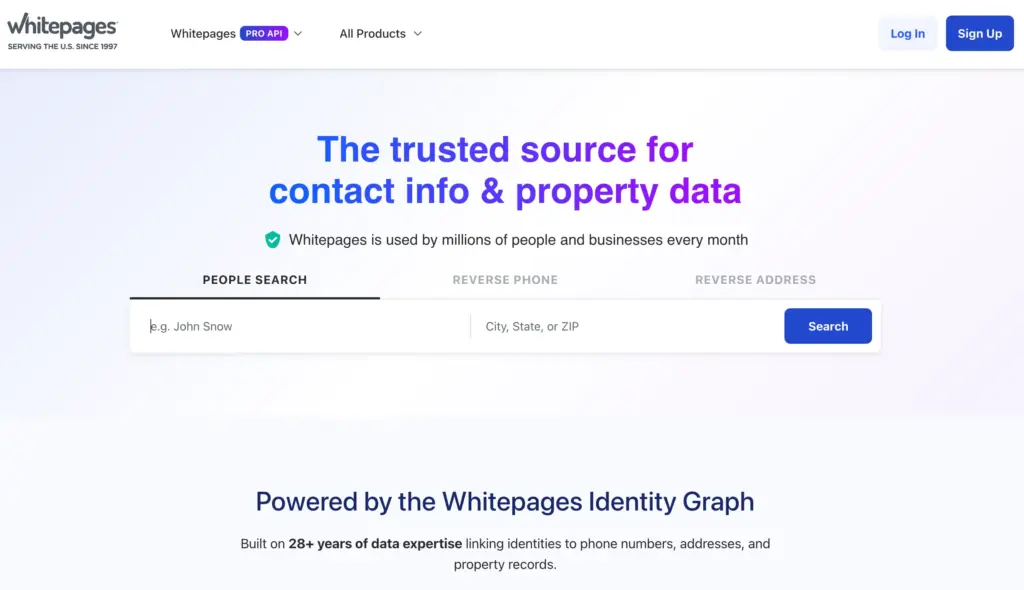
Go to Whitepages.com and search for your listing using your name, city, and state. Click on the correct name in the search results.
Whitepages frequently lists more than one record per person, often with merged or partial data. Search variations of your name and city to find all listings, and repeat this opt-out process for each listing you find.
2. Copy Your Listing URL
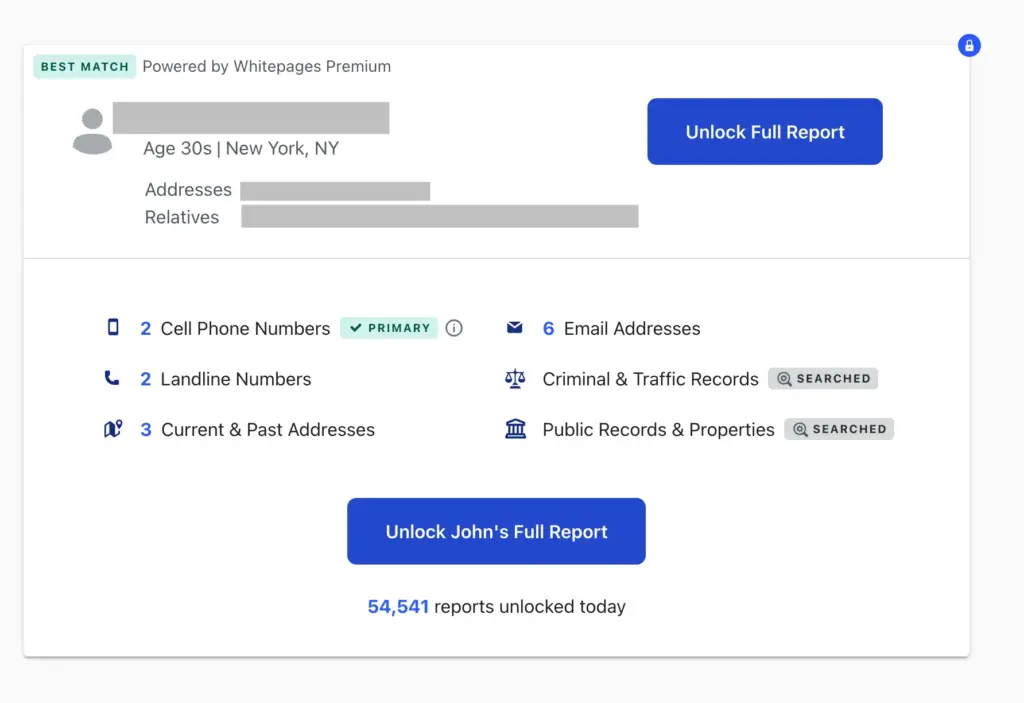
After you’ve clicked on your name, copy the URL of your listing, which will be in your web browser address bar.
3. Open the Whitepages Suppression Form
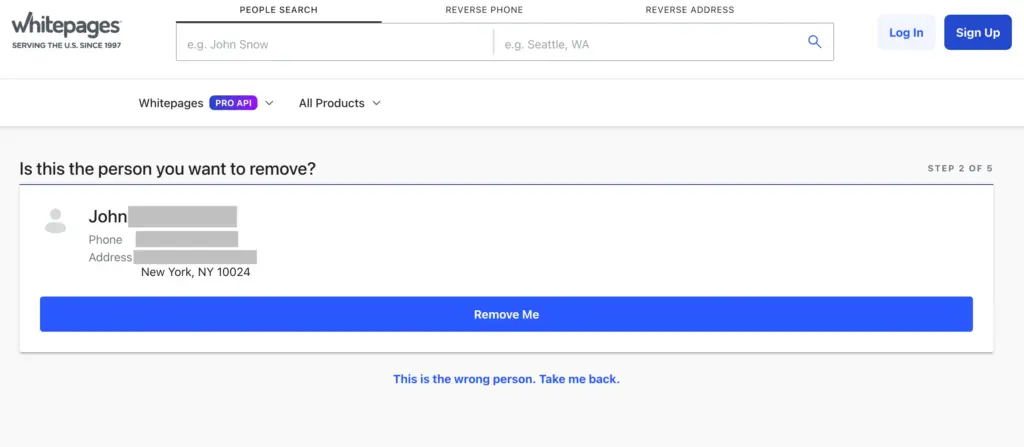
Go to Whitepages.com/suppression-requests. Paste your listing URL in the opt out of Whitepages prompt and click Next.
Confirm that the information displayed is the person you want to remove by clicking “Remove Me.”
4. Choose a Reason and Enter Your Phone Number
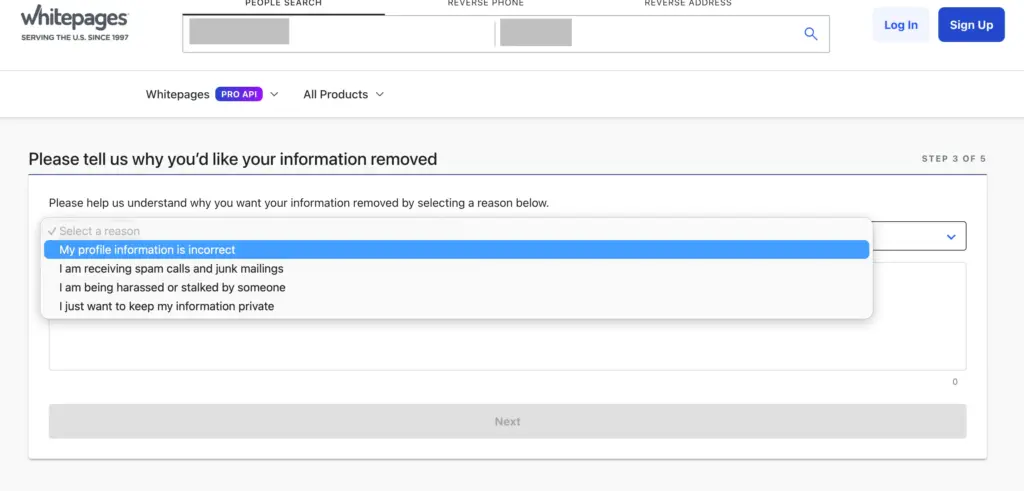
Select a reason for your Whitepages opt out from the drop-down menu, then enter your phone number. A message will appear indicating that you will now receive an automated call requesting the four-digit code that is displayed on the screen.
Note: There is no email verification or other route available through the free Whitepages opt-out form. Completing the process requires an automated call. If you do not want to give Whitepages your phone number, have our privacy team handle it, and you can skip the Whitepages opt-out form entirely.
5. Answer the Verification Call and Enter the Code
You should immediately receive a call from the Whitepages bot (your mobile device may display the number as spam). Answer the call and enter the code when prompted to do so.
What To Do When the Whitepages Verification Call Fails
If you follow the steps above for Whitepages opt out but encounter any issues, try the following troubleshooting steps based on the situation you encounter.
This troubleshooting may be necessary because Whitepages changes its flow without notice.
Whitepages Premium Is a Separate Listing
Whitepages Premium is a paid Whitepages product. Premium reports expose additional personal information beyond what is provided by the free listing.
Data in a Premium report includes fuller contact details and expanded background information that is kept behind a paywall. Results can include current and past addresses, landline numbers, email addresses, criminal and traffic records, public records, and property information.
Whitepages users can pay a one-time fee to access a full report of your information, or they may pay a monthly subscription fee that provides a little or a lot more data with their search results, based on the chosen tiered plan.
Due to the additional exposure, for those desiring to keep their information private, removing this Premium Whitepages listing may be more important than the free listing removal. But suppressing your free Whitepages listing may not clear the paid Premium report.
To verify, check for it separately after the standard Whitepages opt out process is completed. Search for yourself after the standard Whitepages opt out clears, and file a support request if a Premium result still shows.
Your Whitepages Account, Listing, and Subscription Are Three Different Things
It’s easy for users to confuse these three distinct items. But for a successful Whitepages opt out, it’s important to understand the difference.
An account is the login used for running searches on Whitepages. A listing is the public profile that Whitepages has built about a person from public records. A subscription is the recurring charge for Premium access, which unlocks additional data in the listing report.
Because an account and subscription are distinct from a listing, closing an account does nothing about the public listing. Likewise, cancelling a subscription will stop billing, but it leaves the listing live. Only the Whitepages opt out request will remove information from Whitepages.
How To Cancel Whitepages Premium Billing
To cancel Whitepages Premium billing, log in to your account, go to account settings, Purchases and Billing, and select Cancel Subscription or Cancel Auto-Renewal. Per the Whitepages website, you can cancel at any time and will not be charged for the next billing cycle.
While cancelling this subscription stops billing, it does not delete your Whitepages account. If you would like to remove your personal data from Whitepages, this requires more than a Whitepages delete-account process. You’ll need to complete the Whitepages opt-out process.
Is Whitepages Legal?
Yes. Search sites such as Whitepages are within their legal rights to give out your personal information.
Whitepages has a legal California data broker registration, filed with the California Attorney General and approved February 12, 2020. Whitepages states their data supports “fraud prevention, family safety, spam call detection, background vetting, and contacting people outside your inner circle.”
Most of the information provided by Whitepages stems from public records, social media, or other data readily available to anyone with internet access. Because the information is already public record, and a people-search listing is not a consumer report, it does not carry the permissions and dispute rights a background check would.
However, for those who would prefer to exclude their information from Whitepages, state privacy laws provide the right to remove your personal information from data broker sites. This is the same right that the Whitepages opt-out form exercises.
How Whitepages Gets Your Personal Information

Most of the information gained by Whitepages is given to them by major phone companies. Still more personal information is obtained by scraping public records for personal data. This is similar to the tools used by most other people-search sites and data brokers.
Public records may include details about you such as:
- Criminal records
- Financial records
- Names of family members
- Traffic records
- Home and mailing addresses
- Business and personal telephone numbers as well as cell phone numbers
- Contact information not available in standard listings
Because the source of Whitepages information is public records that continue to update, suppression of your data only removes the current listing. The next data update will refresh the content and repopulate your listing.
Is Whitepages Accurate?
Partly. Whitepages merges records, so listings routinely mix details from different people with similar names. This makes it tricky to verify the accuracy of the free information Whitepages publishes. For example, if your name is John Smith, Whitepages has the tendency to blend information together for many different John Smiths.
Getting a correct listing on the first try can often be difficult, even for Whitepages Premium subscribers. Just because it is a premium listing on the site doesn’t mean it is any more accurate than a free listing.
This tendency to merge records is the reason why you may find two or three listings that each partly describe you, with partial accuracy. To remove these duplicates, you must submit a separate Whitepages opt out request for each listing.
What Happens After You Opt Out of Whitepages
Once you have submitted your Whitepages opt-out request, per the confirmation call bot, your listing should be removed within about 24 hours. However, Whitepages does not publish a specific processing time for all opt outs.
To confirm your listing deletion, wait a day or two and perform another search for your name. If it is still there, check to see if it is the same listing or a similar one that requires its own opt-out request. You can also try searching again from a logged-out or private window.
If it is the same listing (the same URL you submitted an opt-out request for), check again after another 24 hours. If your listing is still live at that point, you can visit the Whitepages help center to submit a support request.
Even when this process is successful, it will only suppress your content for a limited time. Whitepages rebuilds listings as it downloads new public records, so your listing can reappear each time this data is refreshed. As a result, a successful opt-out is a temporary result, not a permanent removal.
Two solutions are available to manage this reappearance issue. You can set a calendar reminder to search for your listing quarterly and repeat the process. Or, you can have us monitor and re-remove it for you on an ongoing basis.
Request a Free Consultation
Does a Whitepages Opt Out Cover Other People Search Sites?
No. A Whitepages suppression request covers Whitepages and 411.com, but nothing else.
The 411 site runs on Whitepages data, its footer carries the Whitepages copyright, and its help and privacy links connect to Whitepages. Its people-search page states that it is powered by Whitepages.
As a result, one Whitepages suppression request clears both Whitepages and 411. However, it is best practice to confirm removal on 411.com after completing the Whitepages opt out. For more info, review our 411.com opt out guide.
As our AnyWho opt out guide states, AnyWho removal runs through the PeopleConnect and Intelius suppression center. Yellowpages.com and DexKnows are both Thryv properties, and each has its own opt-out process, as described in our Yellowpages opt out guide and DexKnows opt out guide. None of these sites, or any other people-search sites, are affected by a Whitepages opt out.

411.com Removal
A Whitepages opt out also clears 411.com, but confirm the removal there afterward with our guide.
Read the 411 guide
Spokeo Removal
Spokeo is a separate people-search site with its own opt-out and subscription cancellation process.
Read the Spokeo guide
All Opt-Out Guides
Browse every step-by-step opt-out guide for the major data brokers and people-search sites in one place.
See all guides
Whitepages Opt Out vs. Managed Data Removal
The main differences between a Whitepages opt out and managed data removal are scope and maintenance, not difficulty. Whitepages opt out is free and takes about 10 minutes. However, your data exposure spans dozens of people-search sites, each with its own process and reappearance cycle.
Review your options below to determine whether you prefer the free Whitepages opt out or an internet privacy protection service.
Frequently Asked Questions About Whitepages Opt Out
Is opting out of Whitepages free?
Yes. You can submit a Whitepages opt out request for free. Additionally, you do not have to have a Whitepages account or a paid subscription to file a Whitepages suppression request.
Why does Whitepages need my phone number?
To complete the opt out request, a Whitepages bot will call you to request the confirmation number provided on-screen. This is required to finish the opt out process.
Does deleting my Whitepages account remove my listing?
No. Removing your account does not affect your listing. You must complete the opt out process to remove information from Whitepages.
Does opting out of Whitepages remove me from 411.com?
Yes. Whitepages and 411 are affiliated and run on the same systems, so removal from Whitepages also removes your data from 411.com. To confirm, search for your listing on both sites after the opt out process is complete.
Am I removed from AnyWho or Yellow Pages too?
No. AnyWho and Yellow Pages, along with other data broker sites, have their own opt-out process, which must be completed to remove your listing from those pages.
How long does Whitepages removal take?
The process to complete the opt out request takes about 10 minutes. Per the Whitepages call bot, your listing should be removed in about 24 hours. However, Whitepages does not publish a committed processing window.
Why did my Whitepages listing come back?
This is normal. Whitepages content is updated regularly, each time they refresh their site to incorporate new public data. With each refresh, listings are repopulated. Your data will continue to come back and require a new suppression request each time.
Rated & Recognized

Trustpilot 4.9/5
Based on 2,400+ reviews

Newsweek #1
Best ORM Company 2024

Inc 5000
Fastest-Growing Companies
NeilPatel.com #1
Recommended ORM Service
Take Control of Your Personal Information Online
NetReputation specializes in the removal of personal information from data broker sites like Whitepages. We apply strategies and tools to keep information private across a comprehensive set of people-search sites, rather than Whitepages alone. Our ongoing monitoring through internet privacy services is what keeps personal listings from returning on these sites.
To learn more about how to remove information from Whitepages and how our ongoing removal process works, fill out the form below, and one of our reputation specialists will reach out to you.
Request a Free Consultation